
Free Fire Tournament App — daily custom room matches
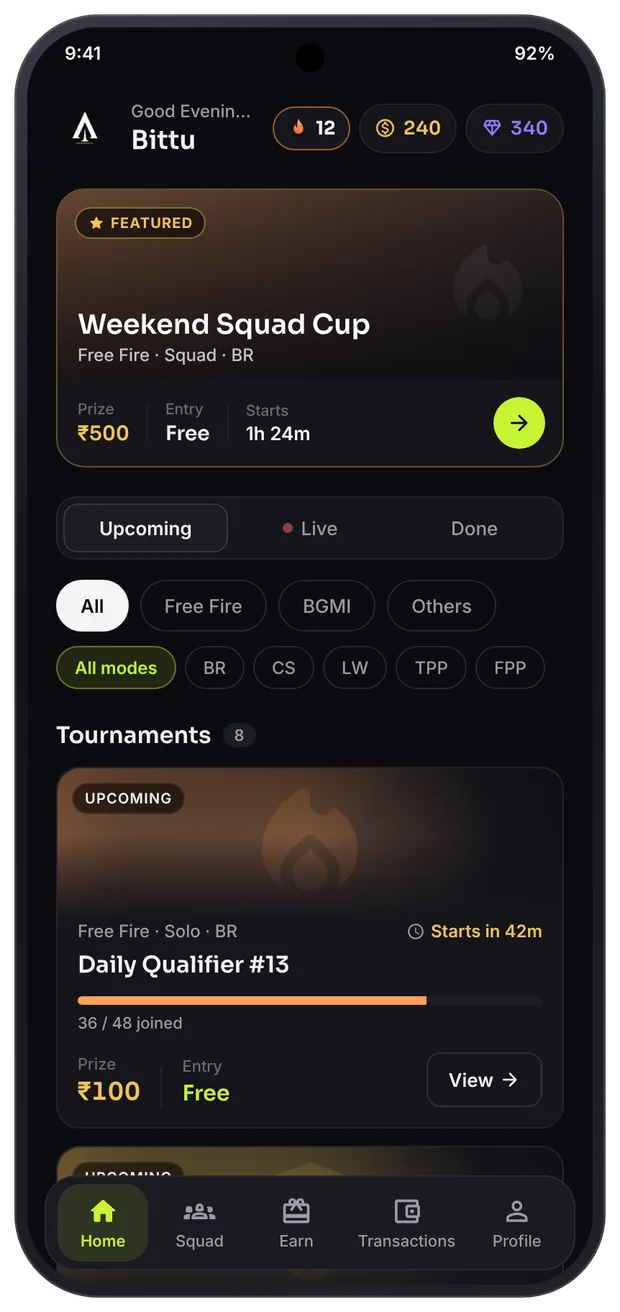
ApnaJeet runs Free Fire Solo, Duo and Squad tournaments every day — BR, Clash Squad and Lone Wolf. Join, get the Room ID by notification, win, and receive your prize as a Google Play redeem code.
Which Free Fire tournaments can you play?
BR
Battle Royale — the classic match where both survival and kills count.
CS
Clash Squad — round-based 4v4 where teamwork matters most.
LW
Lone Wolf — 1v1 or 2v2, a pure test of skill.
Map, rounds, scoring and qualification rules are written in each tournament’s description. Always read them before joining.
How to join a Free Fire tournament
Download the app and sign in with Google
Enter your exact in-game name in your profile — verification depends on it.
Pick the "Free Fire" filter on Home
Open a tournament after checking the mode and entry. Slots, start time and prize are on the detail page.
Read the rules and tap Join
Your slot is locked instantly and the match shows up in My Matches.
Get the Room ID by notification
A reminder 15 minutes before, and the Room ID + password when it goes live. Enter them in Custom Room in Free Fire.
Play and submit your result
Upload the result screenshot. Once verified, the prize appears in My Rewards.
Tips to play better in Free Fire custom rooms
⏱ Be ready 5–10 minutes early
The match can start as soon as the room fills. Check your game update and internet beforehand.
🔔 Keep notifications on
The Room ID comes by notification. Battery saver can block it — allow ApnaJeet.
📸 Take a clear result screenshot
Your name, rank and kills must be clearly visible. Cropped or edited screenshots can be rejected.
🤐 Don’t share the Room ID
Room details are only for joined players. Sharing them can lead to action on your account.

Jeemo: Playing your first Free Fire tournament? Ask me in the app — I’ll walk you through it!
Free Fire tournaments — FAQ
How do I join a Free Fire custom room tournament?
In the ApnaJeet app, pick the "Free Fire" filter on Home, open a tournament, read the rules and tap Join. When the match goes live, the Room ID and password arrive as a notification — enter them in Custom Room inside Free Fire.
Are Free Fire tournaments free?
Many tournaments have free entry. Some bigger ones use Gems or Coins that you get inside the app. There is no option to deposit money.
How do I get my Free Fire prize?
Submit your result screenshot. After verification the prize appears in My Rewards as a Google Play redeem code.
Why does my Free Fire in-game name matter?
Your in-game name is matched against the screenshot during verification. Keep exactly the same name in your profile as in the game.
Join today’s Free Fire match.
Free download. Free or Gem entry. Prizes as Google Play redeem codes.